Higgsfield Lipsync Studio
On Higgsfield (a paid service), turn a still portrait into a short clip where the face lip-syncs your words: pick a plan such as Basic (~$5/mo to try), then Video → Lipsync Studio, upload, add Audio Text, choose Kling 2.6 Lipsync, and generate—with a parent-run account and a photo everyone agrees to use.
How to use it
Use toolEverything you need for this tool is on this page. Overview, safety, and pricing are in “More about this tool” at the bottom.
Only use photos you have permission to use. Never make someone’s face say things they did not agree to—check your school’s rules on AI video before handing in a project.
Higgsfield is a paid product—there is no unlimited free tier for Lipsync. Many families use the Basic plan (about $5 per month when we last checked) as a low-cost way to try credits; verify the current price, credit amounts, and any promos on their Pricing page before subscribing. Then follow Video → Lipsync Studio below.
-
Open Higgsfield and choose Lipsync Studio
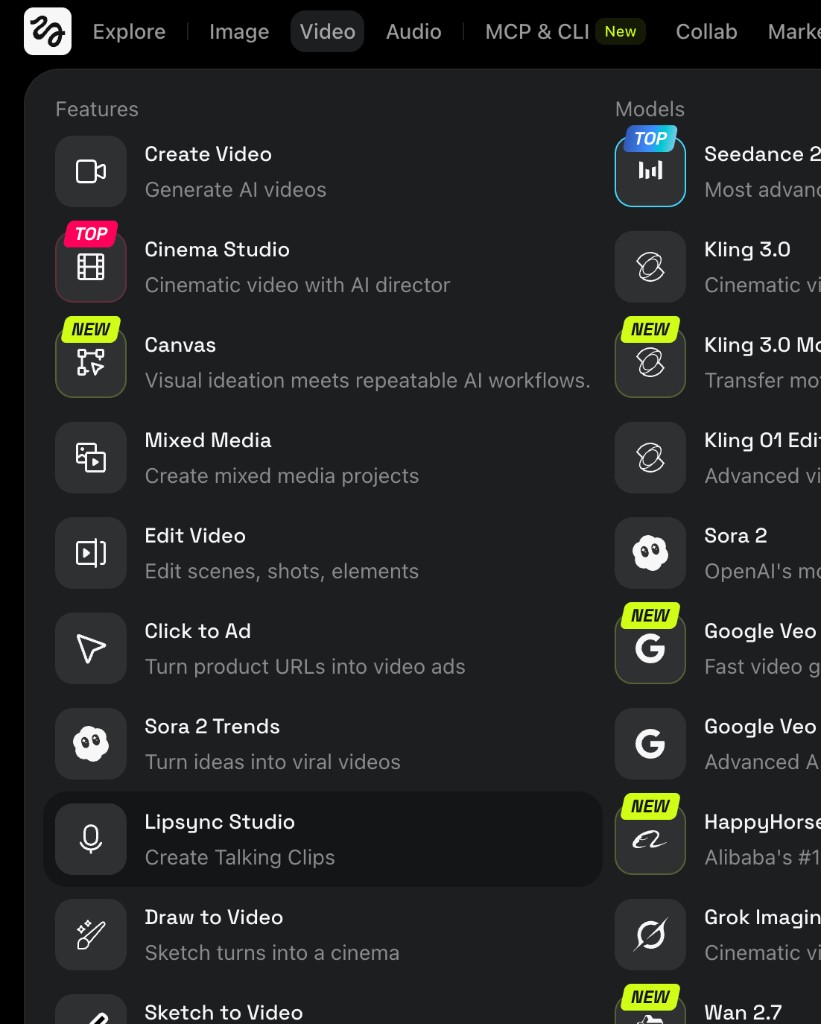
In your browser, go to higgsfield.ai and sign in with a family account if required. In the top navigation, open Video. Under Features, click Lipsync Studio (“Create Talking Clips”).
Tip: If you land on Explore, use the Video tab first—Lipsync Studio lives under Video, not Image or Audio.
-
Pick a plan (paid — Basic is the small trial option)
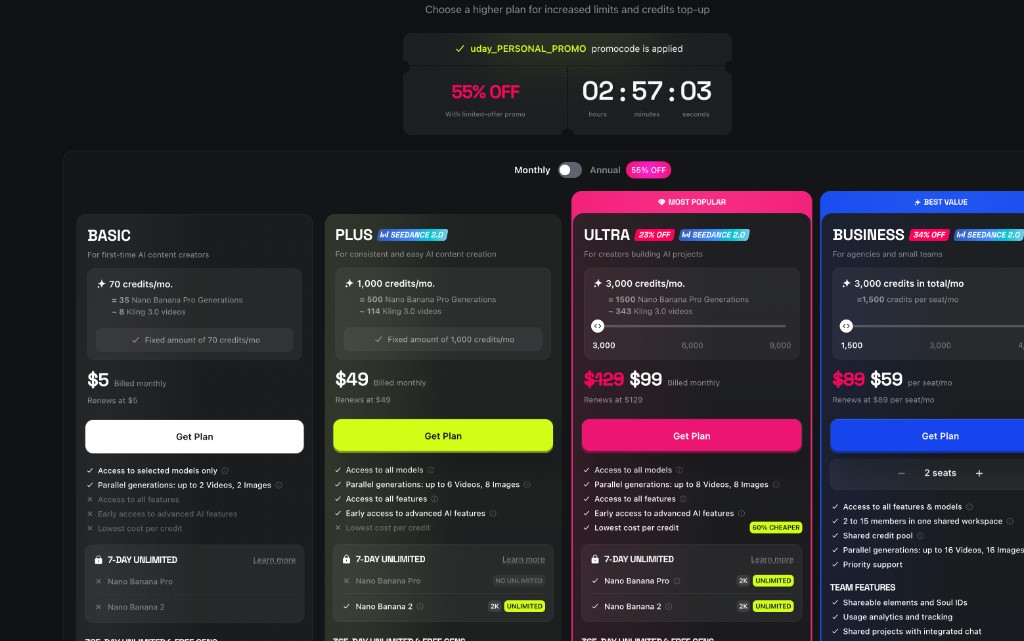
Open Pricing from the site footer or account menu. Expect subscription tiers, not a forever-free studio. The Basic tier is the smallest paid option to experiment with credits; higher tiers add more monthly credits and parallel jobs. The page may show monthly vs annual toggles and limited-time discounts—read the checkout total carefully with a grown-up before paying.
Tip: Basic is meant for light use: budget a few test generations so you do not burn the whole monthly allowance on one long clip.
-
Upload your image
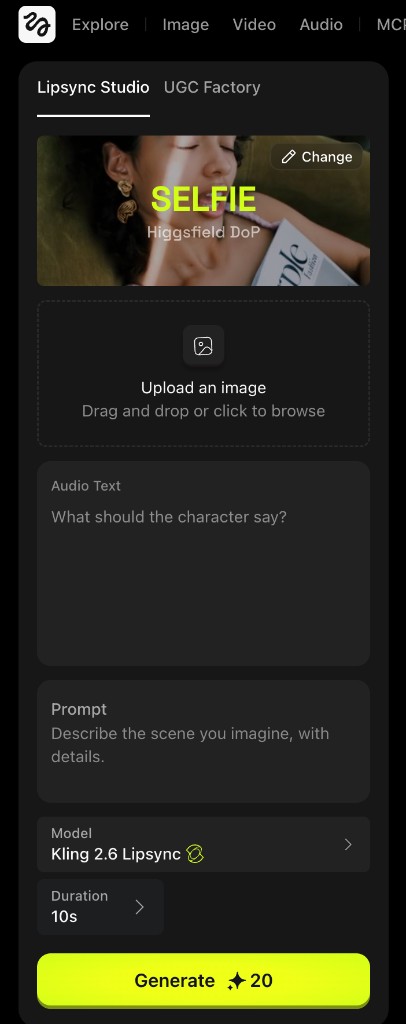
In Lipsync Studio, use the upload area (“Upload an image” — drag and drop or click to browse). Pick a clear, front-facing portrait so the mouth is visible; replace it anytime with Change if you picked the wrong file.
-
Add Audio Text (and optional Prompt)
In Audio Text, type exactly what the character should say—this is what gets spoken and lip-synced. Prompt is optional: use it to describe the scene, mood, or background you imagine so the model can match the vibe.
Tip: Shorter lines often sync more cleanly; try one sentence before a long monologue.
-
Choose Kling 2.6 Lipsync and generate
Open the Model dropdown and select Kling 2.6 Lipsync (wording may read “Kling 2.6” with a Lipsync variant). Set Duration if the app offers it (for example 10s). Click the green Generate button and wait while the job runs—queues and speed depend on the service load.
Tip: The button shows a credit cost drawn from your plan’s monthly pool (Basic is the smallest tier for trying things out). If you are out of credits, wait for renewal or upgrade with a grown-up—do not stack surprise charges.
-
Play the finished video
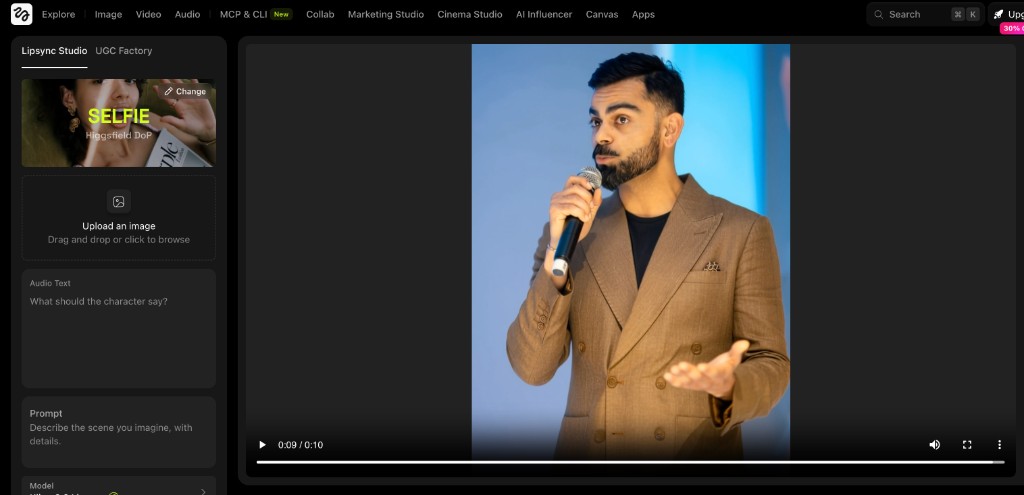
When processing finishes, watch the preview on the right. The still image becomes a short video with lip movement matched to your Audio Text. Download or screen-record only if the product allows and your use case follows consent and school rules.
More about this tool — overview, features, safety, pricing
Overview
Higgsfield’s Lipsync Studio is a paid workflow: you subscribe for a monthly credit allowance, upload a frame, add Audio Text, pick a lipsync model such as Kling 2.6 Lipsync, and spend credits each time you hit Generate.
Other products use similar pipelines; always read the current terms, age limits, and privacy policy on higgsfield.ai before uploading photos of real people.
Image quality, lighting, and how directly the face looks at the camera still matter—side angles and heavy shadows make lip sync harder for any model.
Key features
- Video → Lipsync Studio. A dedicated flow for talking clips instead of general text-to-video—Audio Text drives what you hear and see at the mouth.
- Model choice. Kling 2.6 Lipsync is the option called out in this guide; Higgsfield may add or rename models—pick the lipsync variant that matches your account.
- Credits and subscriptions. Plans combine a monthly fee with credits; Basic is the lowest-cost way to try the product, while Plus/Ultra/Business add more credits and team features—always confirm numbers on the live pricing page.
Safety & privacy notes
Data & accounts
- Uploading a portrait sends it to Higgsfield’s infrastructure for processing. Review their privacy policy for retention, training, and deletion.
- Do not upload IDs, report cards, or screenshots that expose addresses or private chats.
Supervision
- Treat Higgsfield as a creator/pro tool: a parent or teacher should own billing, logins, and decisions about posting outputs.
Content & community
- Lip-syncing a real person without consent can harm reputation and violate policies—stick to agreed subjects, licensed art, or characters you created.
- Some schools restrict or disclose AI-generated media; ask before submitting for a grade.
Family project ideas
- Museum-style talking portrait. Use an original drawing or a family-approved photo, write a 15–30 second script from research, generate with Kling 2.6 Lipsync, and pair the clip with citations in Slides or Canva. (45–90 min)
- Language line practice. Type a short dialogue in the language you are studying, generate, and compare lip timing with a native recording from class. (20–40 min)
Pricing & account
Paid — Basic from ~$5/mo — Not free: plans are monthly subscriptions with a credit allowance (for example Basic around $5/mo with a modest monthly credit pool—exact price and credits change, so confirm on higgsfield.ai/pricing). Each generation still costs credits on top of the subscription.
Account required: Yes
Platforms: web