Suno AI
Turn short text ideas into full songs with vocals and backing tracks—great for exploring songwriting as a family.
How to use it
Use toolEverything you need for this tool is on this page. Overview, safety, and pricing are in “More about this tool” at the bottom.
Use a parent-managed account for younger kids; review lyrics and sharing settings before posting.
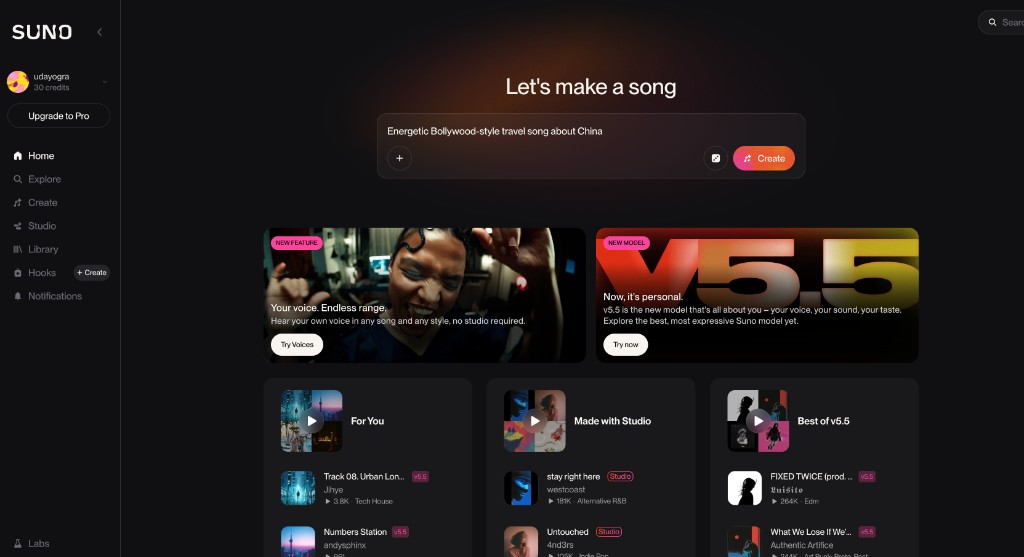
Example below: type a style and topic in plain English—here we use “Energetic Bollywood-style travel song about China”—then tap Create. The layout may differ slightly after Suno updates.
-
Sign in and open Create
Log in on suno.com (or the app) with a family account if your child is under the service’s minimum age. Open Home or Create so you see the big prompt box and a Create button.
Tip: Check the current terms for age limits before letting kids use their own login.
-
Type your prompt
Describe mood, genre, and topic in one line. Example: Energetic Bollywood-style travel song about China. You can use Simple mode first; Advanced is optional later.
-
Tap Create
Press Create (or the equivalent). Wait while Suno generates—usually two versions at a time. Credits apply; the free tier gives a limited number of generations per day (see the site for the current amount).
Tip: If nothing appears, check credits or try a shorter prompt.
-
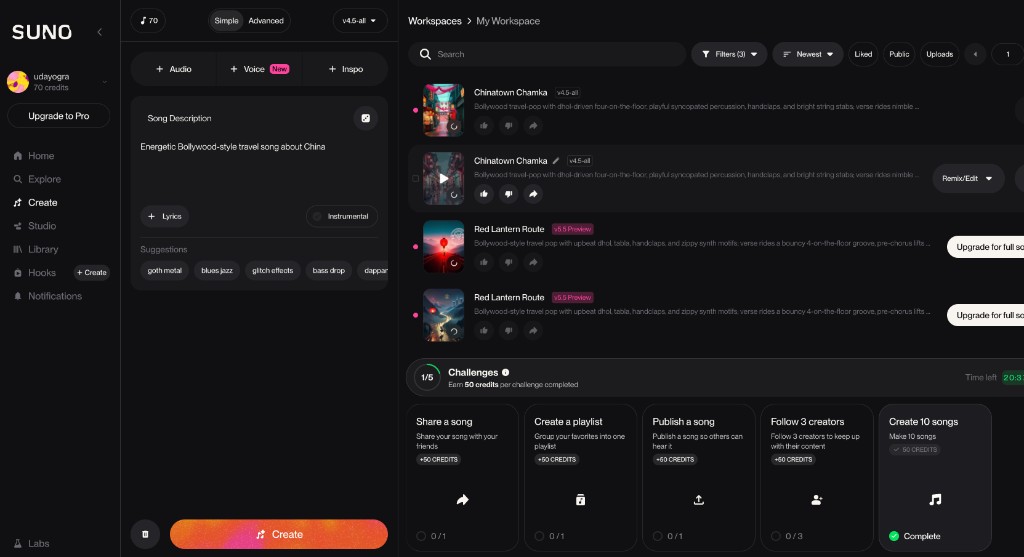
Listen and pick a version
Your workspace lists the new tracks with cover art and play buttons. Play each take, compare titles and styles, then favourite or continue editing if Studio is available on your plan.
-
Refine or start over
Use Remix/Edit if offered, or change the prompt (shorter often works better). Do not treat lyrics as facts—especially for travel, history, or real places.
Tip: Add “fictional, silly only” if the model invents odd facts.
-
Download or share carefully
Read lyrics together before sharing. Prefer private or unlisted options first; community features mean other people’s content may appear too.
More about this tool — overview, features, safety, pricing
Overview
Suno turns a short text description into full songs—vocals, lyrics, and backing instruments—across many genres.
Newer models sound more natural than early versions; Suno Studio adds multitrack editing, stems, and recording when you need more control.
For families it is a quick way to hear an idea as music. The free tier includes daily credits (enough for a short session—confirm the current limit on Suno’s site). Suno’s terms typically require users to be 13+; younger children should use a parent-managed account.
Key features
- Full songs from prompts. Describe what you want in simple words and get back lyrics and accompaniment—good for silly experiments and serious drafts alike.
- Editing and stems (on some plans). Higher tiers may offer multitrack or stem-style workflows so older kids can learn how songs are layered.
- Cross-device. Often usable on web and mobile; free tiers may cap daily generations—plan prompts for a short session.
Safety & privacy notes
Data & accounts
- Account services usually store prompts and outputs. Read the privacy policy for retention, training use, and deletion.
- Younger children should not manage billing, public profiles, or community posting alone.
Supervision
- Assume limited child-specific controls; household rules and supervision matter more than toggles.
Content & community
- If the product has public feeds or sharing, treat it like other user-generated platforms: lyrics and comments may be unpredictable.
Family project ideas
- Birthday song. Draft kind, funny lyrics together, generate a few versions, pick the best one. (20–40 min)
- Slideshow soundtrack. Pick a genre to match home video or slides; try an instrumental-style prompt if voiceover matters. (30–60 min)
Pricing & account
Freemium — Free tier with daily limits; paid plans for more—check the official site.
Account required: Yes
Platforms: web, ios, android